Production scheduling
The problem
In Spire's Production module, only one production order's Expected Start Date can be changed at a time. A factory shutdown, machine repair, or other delay that affects many orders becomes a long, repetitive edit. Each extra click is another chance to key the wrong date.
What we built
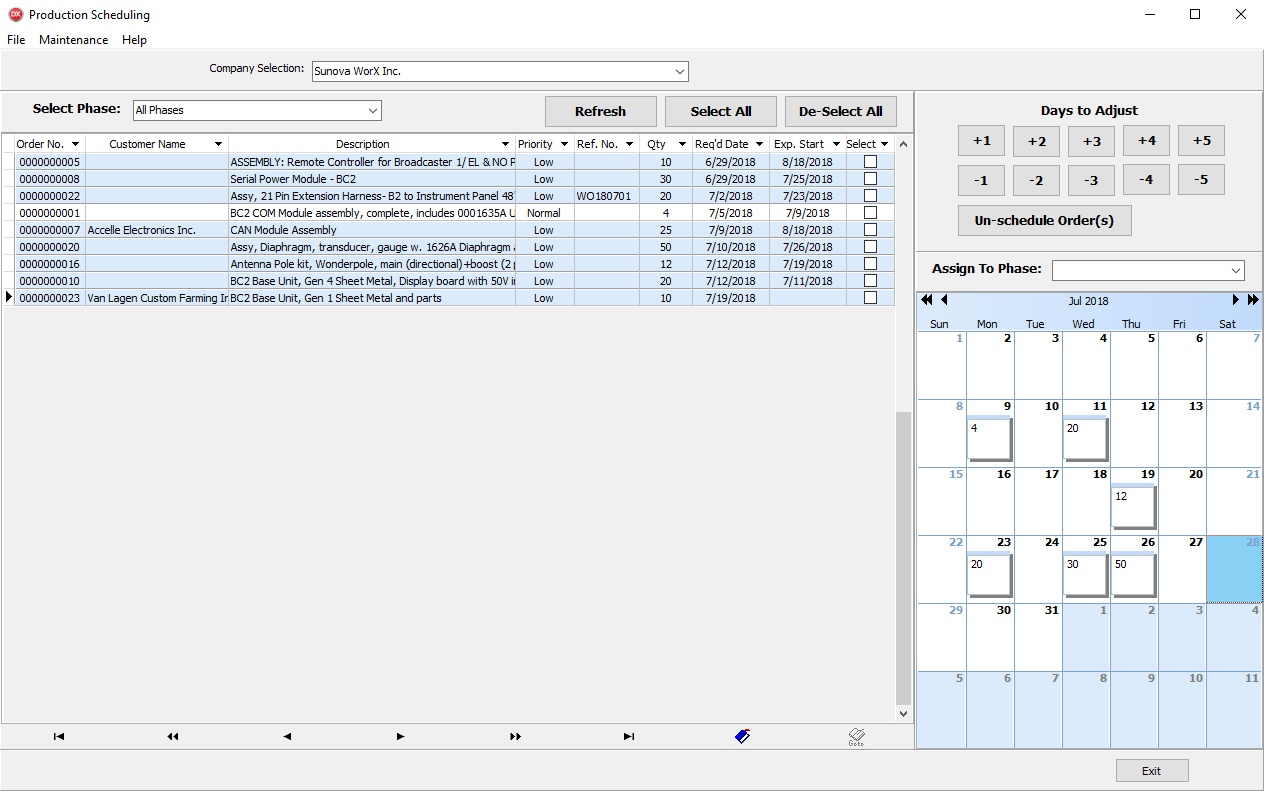
The client asked for a way to change several production orders at the same time. Don McIntyre Consulting Ltd. built a Windows Production Scheduling application that lists Spire production orders, filters them, and applies date and phase changes in a batch.
What the application does
- A graphical list of production orders you can view and change
- Batch-move Expected Start Dates by plus or minus up to five days, or to a chosen date
- Batch-move selected orders from one production phase to another
- Un-schedule production orders in one step
- Right-click a calendar date to see every production order expected that day
- Primary filter by phase
- Fine-tune the list by any production-order field
- Admin users have full access; other users have read-only access
The result
The client now updates many production orders together instead of one record at a time.
Save time
Date and phase changes that used to be one order at a time are applied to a selected batch. A shutdown or repair no longer means walking the schedule line by line.
Reduce errors
Fewer manual edits means fewer mistyped dates. Admins make the change; everyone else can still read the schedule without changing it.